


The metric has no math
A dashboard shows the number and stops. Without the movement behind it, growth from ten new logos looks the same as growth from one customer upgrading, and only one of those repeats next month.

Recurring revenue is a result, not an explanation. Futureproof calculates every revenue metric from your billing data on the general ledger that is your system of record, and shows the movement underneath: what was new, what expanded, what contracted, and what churned.
How recurring revenue moved
Opening plus new plus expansion, less contraction and churn, equals closing.
Revenue metrics describe how recurring revenue is behaving: how much of it is new, how much came from existing customers expanding, how much contracted, and how much left. A single headline number hides all four, which is why revenue that rises every month can still be a company quietly losing its best accounts.
A dashboard shows the number and stops. Without the movement behind it, growth from ten new logos looks the same as growth from one customer upgrading, and only one of those repeats next month.
Revenue keeps rising while budget gets spread evenly, because nothing tells you which acquisition cohort is still paying at month twelve and which one quietly emptied out by month six.
Billing reports one number and the statements report another. Revenue billed up front has to be earned across the months it covers, and a side spreadsheet rarely does that the same way twice.
Setup is one sitting. Every figure afterwards is calculated on the ledger your books post to, so the metric you quote and the statement you file cannot disagree.
Your billing system and your bank connect once, and your full subscription history imports, upgrades, downgrades, and cancellations included.
Invoices, contracts, and the revenue earned each month post to the ledger, so revenue billed up front is earned across the term it covers.
Recurring revenue and its annual run rate, logo and revenue churn, net revenue retention, lifetime value, acquisition cost, and the ratio between them.
Hugo ranks how each cohort retains and expands, and brings you the accounts at risk. Where the next acquisition dollar goes stays your call.
The figures worth acting on are the ones you can take apart. Each of these resolves to postings you can open and customers you can name.
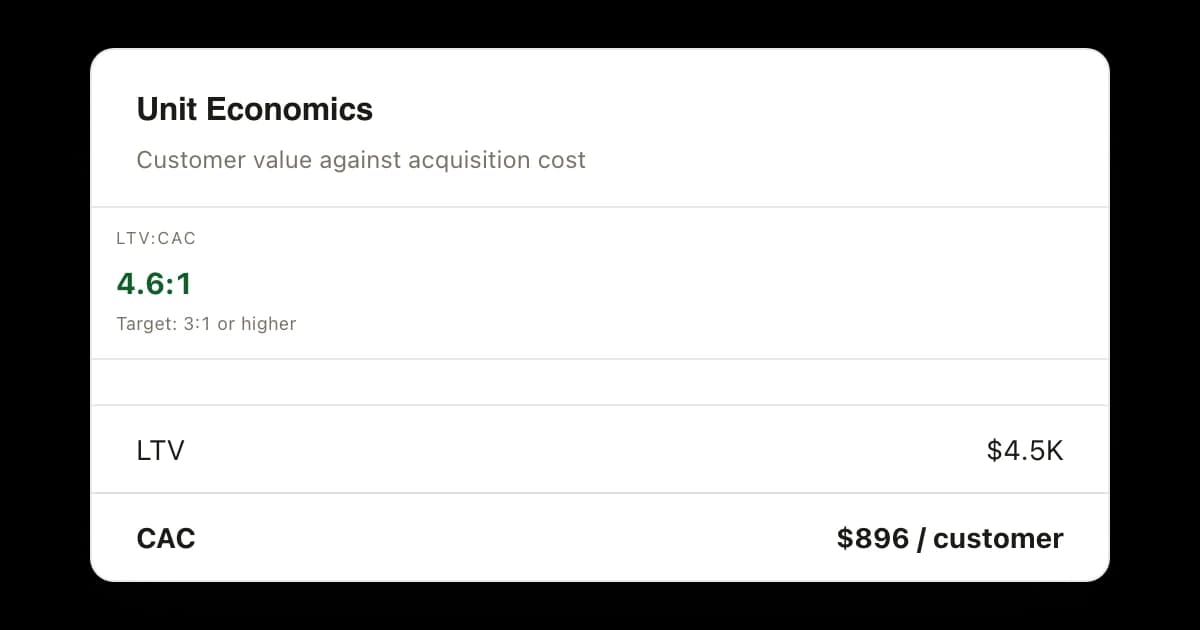
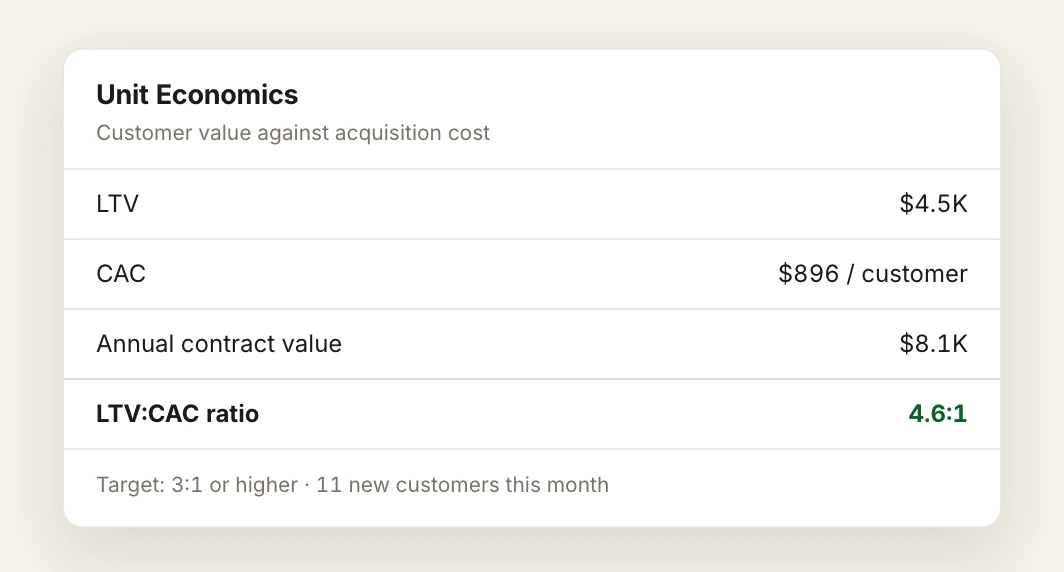
A customer is worth $4.5K across its life and costs $896 to win, a ratio of 4.6 to 1 against the 3 to 1 an investor treats as healthy. Both halves come from your own postings, so the spending decision is made on your numbers instead of somebody else's benchmark.
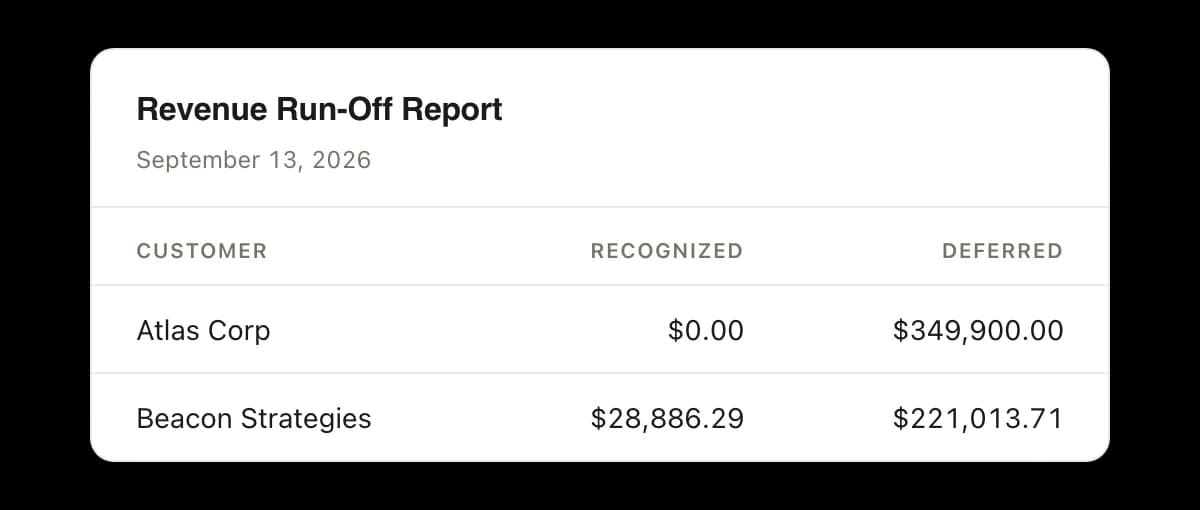
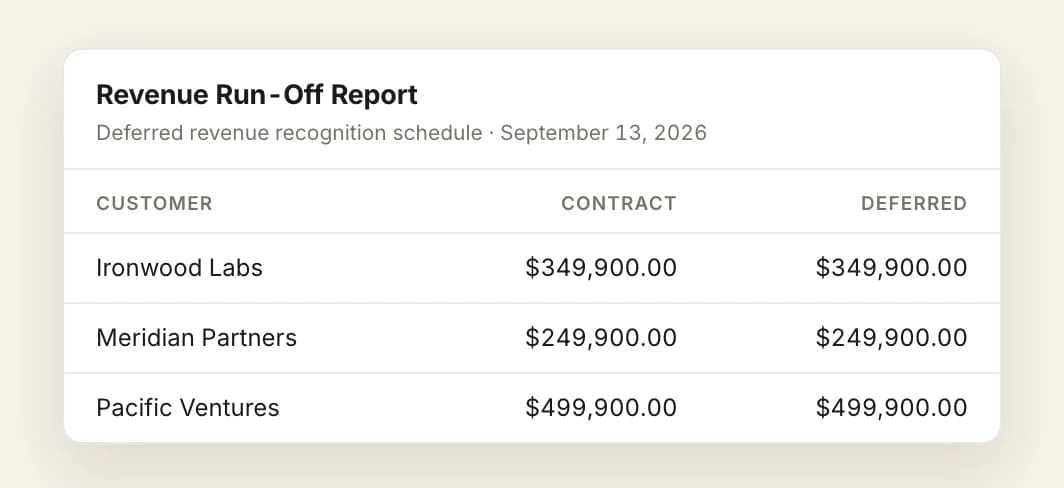
The run-off report carries every contract with what has been recognized and what is still deferred: Atlas Corp with nothing recognized against $349,900.00 deferred, Beacon Strategies with $28,886.29 recognized and $221,013.71 still to come.
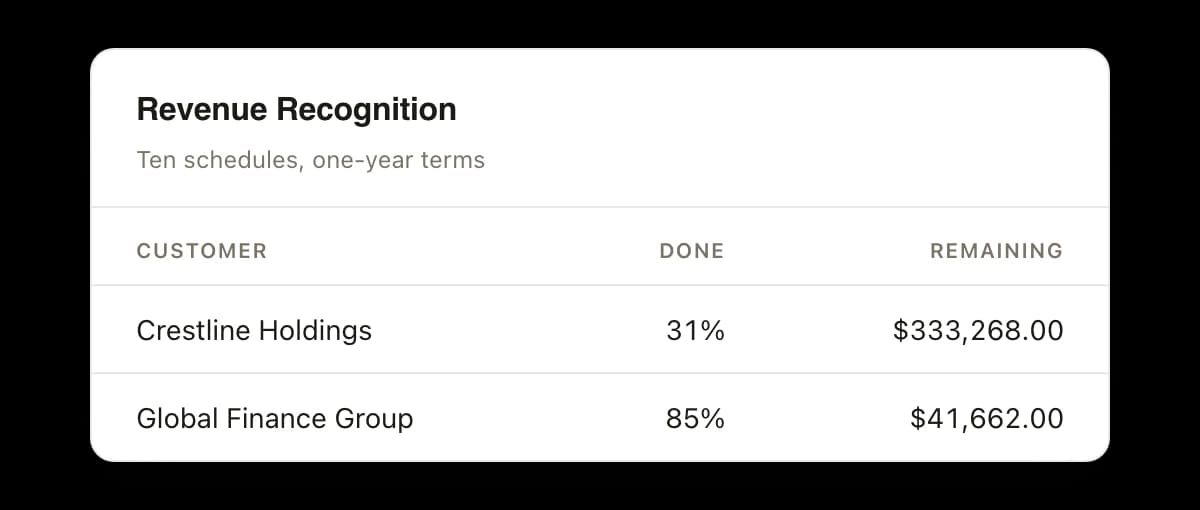
Each recognition schedule shows how far into its term a contract has run and how much of it is left to recognize, so the revenue counted this month is the revenue the month actually earned.

Hugo calculates recurring revenue, churn, retention, and unit economics from your billing data, reconciles them against the general ledger, and brings you a weekly read on what moved and which accounts look at risk.

Remi issues the invoices, chases what is outstanding, and matches the payments that arrive, so the revenue inside a metric is revenue that was billed and collected rather than assumed.

Vic posts and reconciles daily and closes the month, so an annual contract lands across the months it covers instead of all at once in the one it was paid in.
The roll-forward with its formula, the metrics strip beside it, and the revenue still to be earned.
The report carries its own formula under the title: beginning MRR plus new plus expansion, less contraction and churn, equals ending MRR. Across a twelve-month window it opens at $28,905.33 in September 2025 and closes at $43,437.32 in August 2026, a net gain of $14,531.99 and 58 paying customers at the close.
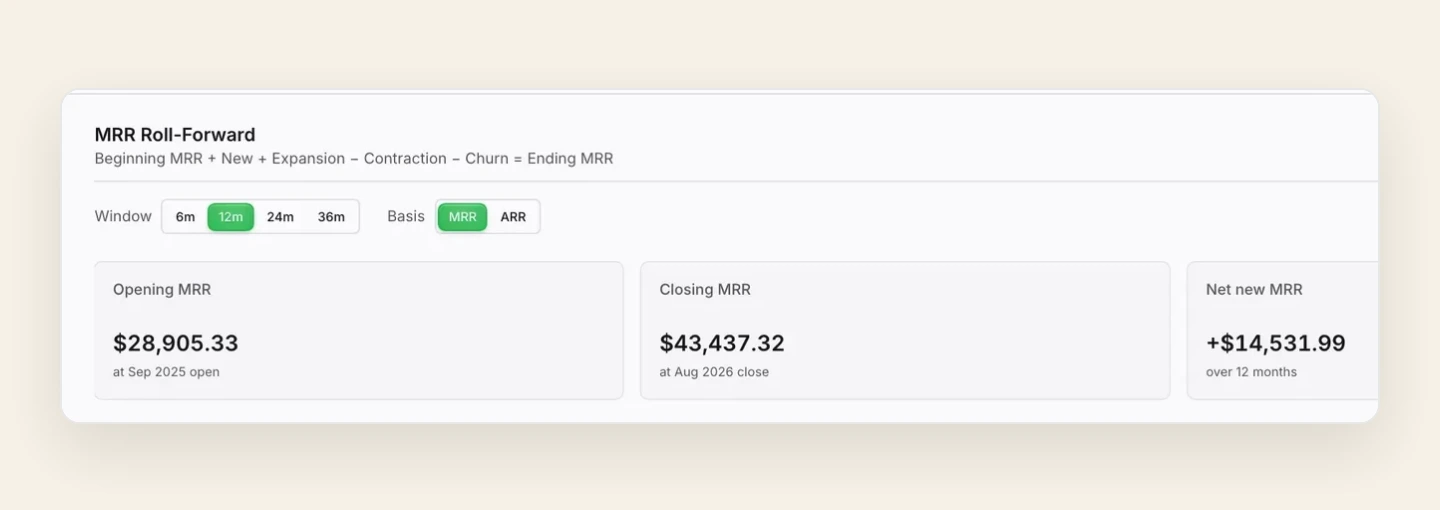
The same screen reports new MRR of $3.4K and new ARR of $40.4K this month, cumulative monthly recurring revenue of $47.2K and cumulative annual of $566.5K, with an average contract value of $8.1K per customer annually.
The run-off report is dated and lists every active and completed contract with its amount, its start and end dates, what has been recognized, and what is still deferred, month by month across the columns to the right.
Recurring revenue and its annual run rate, committed recurring revenue, logo and revenue churn, net revenue retention, average contract value, lifetime value, customer acquisition cost, and the ratio between them. Every figure is calculated from your billing data on the general ledger your books post to.
It is the arithmetic behind the headline number. Opening recurring revenue, plus new, plus expansion, less contraction and churn, gives the closing number. Futureproof presents it month by month across the window you choose, with the customers behind each movement listed underneath, so you can see what caused the change rather than only that it happened.
Yes. Hugo analyzes how each acquisition cohort retains and expands over its life, so you can rank cohorts by what they are still worth a year in and put acquisition spend behind the customer profile that compounds.
Revenue billed up front is earned across the term it covers, so each contract carries what has been recognized so far and what is still deferred, month by month. The metrics and the statements read from the same postings, which is why they agree.
For most startups, yes. The same metrics are calculated here, and because your books, your forecast, and your cap table sit on one ledger, every number you show an investor traces to the statements underneath it instead of to a separate system that has to be reconciled first.
Your numbers. Your answers. Smarter moves.
Connect your billing and your bank, and the month's movement is explained before you go looking for the cause.
Starting at $1,000/month for all six agents, with a monthly review call with a human financial specialist included. No per-seat fees, no modules.